
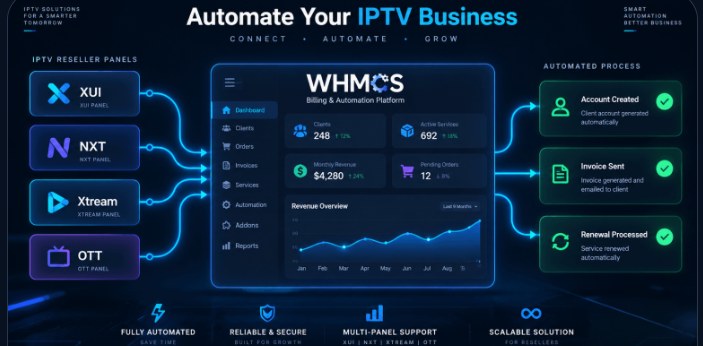
At some point, every IPTV reseller hits the same wall: subscriber count goes up, and so does the amount of manual work. Activating trials by hand, extending subscriptions in a panel, messaging customers about renewals, and chasing failed payments all eat into hours you should be spending on growth. WHMCS automation is how resellers break out of that loop — and in 2026, it’s no longer optional if you want to scale past a few hundred customers.
What “WHMCS automation” actually means for IPTV
On its own, WHMCS is just a billing and client-management platform. The automation comes from connecting it to your IPTV reseller panel through a provisioning module, so that WHMCS and your panel talk to each other automatically. Once that connection exists:
- A new order triggers instant account creation on your panel — no manual login required.
- An unpaid invoice automatically suspends the line after your grace period.
- A renewal payment automatically extends the subscription and reactivates it.
- Package changes (upgrading connections, adding devices) sync to the panel without a support ticket.
Why manual provisioning stops working at scale
Manual activation is manageable at 20 customers. At 200, it becomes a part-time job. At 1,000+, it becomes the reason resellers burn out or start missing renewals — which directly costs revenue. We’ve seen resellers lose 10–15% of monthly recurring revenue simply because nobody caught expired subscriptions in time. Automation removes that failure point entirely.
What a good WHMCS automation module should handle
Not all provisioning modules are built equally. When we build or recommend one for a reseller, it needs to cover:
- Create, suspend, unsuspend, terminate — the four core lifecycle actions, fully automatic.
- Package mapping — each WHMCS product maps cleanly to a connection count / package on the panel side.
- Client-area self-service — customers should be able to view credentials, M3U links, and device info without a ticket.
- Credit/reseller balance sync — for resellers who buy credits upstream, balance checks should happen before provisioning, not after.
Off-the-shelf modules vs. custom development
Most resellers start with a ready-made module — our WHMCS OTT Modules catalog covers the most popular panels and reseller scripts, already built and tested. That covers the majority of setups well.
Where it gets more interesting is when a reseller’s workflow doesn’t fit the standard pattern — multiple panels under one WHMCS install, a custom credit system, or a panel with no existing module at all. That’s where custom WHMCS development comes in: we build the provisioning logic around your exact panel’s API instead of forcing your business to adapt to a generic module.
Getting started with automation
If you’re currently activating anything by hand, the fastest win is usually the simplest: connect your existing panel to WHMCS with the matching module from our WHMCS Automation service, map your packages once, and let the lifecycle events run themselves from day one. Most resellers recover the setup cost within their first month just from the support time saved.
Not sure whether your panel has a ready-made module or needs a custom build? Send us your panel details and we’ll tell you the fastest path to full automation.
Need help setting this up?
Our team builds and supports WHMCS automation, payment gateways, IPTV apps, and websites for streaming businesses every day.
Get a Free Quote